
RoleplayLives is community-funded. People who support the site (we call them supporters) get a set of extra features as a thank-you. This page explains every one of them: what it is, where to find it, and how to use it. Everything else on the site is free for everyone and always will be.
Not a supporter yet? See Support the Site for the price and how to sign up. Looking for the everyday how-to? Try the Site Guide and the FAQs.
Quick tour of the supporter features:
| Feature | Where you will find it |
|---|---|
| No inactivity deletion | Automatic |
| Unlimited characters | My Characters |
| Expanded editor (fonts, sizes, colors, lists, alignment, tables and more) | Posts, stories, bios, custom profile sections, comments |
| Custom profile colors and fonts | Edit your author or character profile |
| Profile picture frames | Edit your author or character profile |
| Story header images | New Story / Edit Story |
| Thread Tracker tab | Your profiles, plus a switch on each story |
| Hide OOC posts | Settings |
| One-click backups | Dashboard |
| Post-to-story conversion | The book icon on your posts |
| Supporter badge | Your author Info tab |
| More than one author account on the same network | Sign-up |
No Inactivity Deletion
Free accounts that have not been active for 90 days are marked for deletion, with a 30-day grace period before everything is removed. The account's login is locked while it is marked, and a note like "(TBD date)" is added to the names on the account. Supporter accounts are skipped by this cleanup, so you can take a long break without worrying about coming back to find your accounts gone.
"Active" means logging in, posting, writing a story or commenting. See the Rules for the full policy.
Unlimited Characters
Free accounts can have up to 25 characters. Once you reach 25, the "Create New Character" button on My Characters is replaced with a note about becoming a supporter. Supporters can create as many characters as they like. (Free accounts that already have more than 25 are not trimmed, they just cannot add more.)
Expanded Editor
Every member gets the basic editor: view HTML, undo/redo, paragraph formatting, bold, italic, strikethrough, links, images, GIFs (Giphy), voice-to-text, clear formatting and full screen. Supporters get a lot more.

| Supporter tool | What it does |
|---|---|
| Font | Pick from 170 fonts (listed below). The menu is alphabetical, and each name appears in its own font as you scroll. |
| Font size | Make selected text bigger or smaller. |
| Text color / Text background color | Color the text itself, or highlight it with a background color. |
| Superscript / Subscript | Small raised or lowered text. |
| Bulleted and numbered lists | Make lists in your posts and stories. |
| Alignment | Left, center, right and justified text. |
| Indent / Outdent | Push a paragraph in or back out. |
| Horizontal rule | A dividing line, handy for scene breaks. |
| Tables | Insert tables, with cell background color and border color controls. |
Where it works: the post editor, the story editor, your author and character bios, custom profile sections, and the comment box (fonts, sizes and colors).
Fonts you can use
There are 170 fonts, grouped by mood below. Each name appears in its own font as you scroll to it. The Default Font and Default Header Font menus on your profile settings have the same fonts and the same groups, and you can search them by name.
Story and Novel
- Crimson Text
- EB Garamond
- Libre Baskerville
- Lora
- Merriweather
- Playfair Display
Easy Reading
- Atkinson Hyperlegible
- Faculty Glyphic
- Josefin Sans
- Lexend
- Montserrat
- Quicksand
Typewriter and Manuscript
- Courier Prime
- Cutive Mono
- Space Mono
- Special Elite
- Xanh Mono
Diary and Handwritten Letters
- Amatic SC
- Architects Daughter
- Caveat
- Coming Soon
- Covered By Your Grace
- Handlee
- Homemade Apple
- Indie Flower
- Kalam
- Nothing You Could Do
- Over the Rainbow
- Rock Salt
- Shadows Into Light Two
- Zeyada
Romance and Formal Script
- Alex Brush
- Dancing Script
- Great Vibes
- Jim Nightshade
- Kaushan Script
- Lobster
- Meow Script
- Pacifico
- Parisienne
- Rouge Script
- Satisfy
- Tangerine
- Yellowtail
Creative and Expressive
- Akronim
- Aladin
- Arbutus
- Atomic Age
- Barriecito
- Barrio
- Emblema One
- Freckle Face
- Fruktur
- Kavoon
- Keania One
- Lily Script One
- Miltonian Tattoo
- Mystery Quest
- Peralta
- Protest Guerrilla
- Protest Riot
- Purple Purse
- Ribeye
- Ribeye Marrow
- Risque
- Rubik Marker Hatch
- Rubik Moonrocks
- Sonsie One
- Spicy Rice
- Trochut
- Vampiro One
- Vast Shadow
Cute and Bubbly
- Bubblegum Sans
- Chewy
- Chicle
- DynaPuff
- Love Ya Like A Sister
Scene, Punk and Graffiti
- Finger Paint
- Knewave
- Lacquer
- Permanent Marker
- Piedra
- Protest Revolution
- Rubik Glitch
- Rubik Vinyl
- Rubik Wet Paint
- Sedgwick Ave Display
- Slackey
Goth and Horror
- Butcherman
- Creepster
- Eater
- Griffy
- Jolly Lodger
- Metal Mania
- New Rocker
- Nosifer
Blackletter and Medieval
- Germania One
- Grenze Gotisch
- IM Fell English SC
- Manufacturing Consent
- MedievalSharp
- Pirata One
- Texturina
- Uncial Antiqua
Fantasy and Fairy Tale
- Almendra
- Almendra Display
- Almendra SC
- Amarante
- Aubrey
- Caesar Dressing
- Cinzel
- Cinzel Decorative
- Eagle Lake
- Fondamento
- Luxurious Roman
- Macondo
- Marcellus SC
- Metamorphous
- Quintessential
Sci-Fi and Cyber
- Audiowide
- Exo 2
- Michroma
- Monoton
- Orbitron
- Oxanium
- Share Tech Mono
- Syncopate
- Tilt Neon
- Wallpoet
- Zen Dots
Pixel and Old Web
- Bitcount Prop Single
- Jersey 15
- Pixelify Sans
- Press Start 2P
Poster, Stencil and Slab
- Anton
- Crushed
- Holtwood One SC
- Iceberg
- Ranchers
- Stardos Stencil
Vintage and Pulp
- Abril Fatface
- Bahianita
- Bebas Neue
- Limelight
- Oleo Script
- Poiret One
- Righteous
- Shrikhand
- Yesteryear
Wild West and Pirate
- Rye
- Sancreek
- Trade Winds
Comic Book
- Alfa Slab One
- Bangers
- Bungee
- Luckiest Guy
Novelty
- Black Ops One
- Bungee Inline
- Chango
- Oi
- Titan One
Device Fonts
- Arial
- Courier New
- Georgia
- Lucida Console
- Segoe UI
- Tahoma
- Times New Roman
- Trebuchet MS
- Verdana
Tips:
- The Device Fonts group (Arial, Courier New, Georgia, Lucida Console, Segoe UI, Tahoma, Times New Roman, Trebuchet MS and Verdana) comes from the reader's own device, so those fonts can look different from one device to another. The rest are web fonts that load from the site.
- Fancy fonts are lovely in small doses. A long scene in a very decorative font can be hard on readers' eyes, so try the Story and Novel or Easy Reading groups for longer writing.
- Not every font has its own bold or italic. In those fonts the browser imitates them, which can look a little rough, so preview before you post.
Custom Profile Colors and Fonts
Supporters can recolor their author profile and each character profile with eight color settings and two font settings, using a color picker or a pasted hex code. The font menus are grouped by mood and you can search them by name. There is a one-click reset, and nothing changes until you save.
This feature has its own detailed guide with sample color schemes, font combinations and screenshots: Custom Profile Settings Guide.
Profile Picture Frames
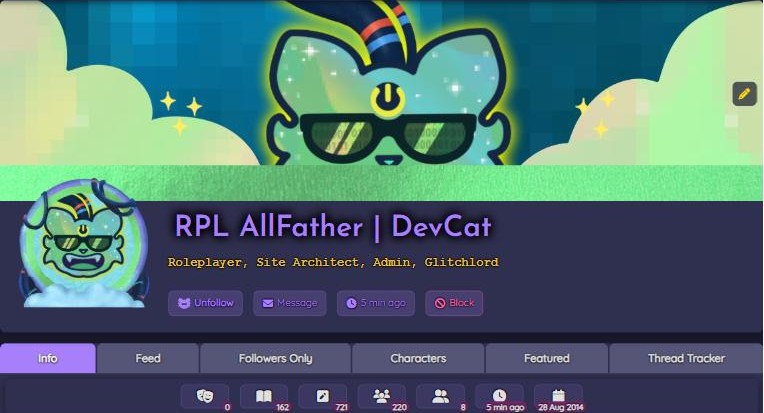
A frame is a decorative image that sits around your profile picture on your author profile or on a character profile. Each profile has its own frame setting, so your author and every character can have a different one.
Your frame also shows around your picture at the top of your posts and stories, and next to your comments and the comment box when you comment as that author or character.
How to add one
- Open the edit form for the profile: click the pencil icon on your author profile (or on the character).
- Scroll to the IMAGES section and find Choose a profile picture frame (optional).
- Paste the web address (URL) of your frame image into the box. It is a link to an image that is already hosted somewhere online, not a file upload.
- Save the profile.

Making a frame that fits:
- The ideal frame image is 200 x 200 pixels with a circular opening 160 pixels across in the middle, so your profile picture shows through.
- Use an image format that supports transparency (PNG works well) so the opening is see-through.
- The link has to go straight to the image itself and be viewable by anyone, otherwise the frame will not appear.
- To remove a frame, clear the box and save.
Story Header Images
Give a story its own banner. On the New Story or Edit Story form, supporters get a Story Header box. Paste the link to an image there. The best size is 1140 x 300 pixels, the same as a profile header.

The banner shows on the story's card in feeds, in the Featured tab and in the Thread Tracker. Like frames, the header is a link to an image hosted online, not an upload.
Thread Tracker
The Thread Tracker is a tab on your profile that lists the stories you want people (and you) to be able to keep tabs on. It is a handy at-a-glance board of your open threads. It appears on author profiles and character profiles whose owner is a supporter.
Adding a story to your tracker
- Create or edit a story.
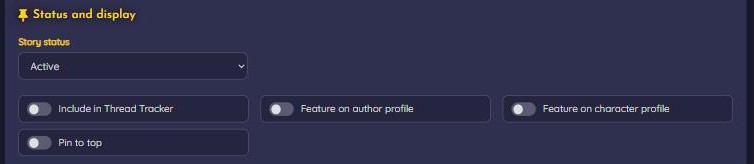
- Near the bottom of the form, in Status and display, turn on Include in Thread Tracker.
- Set the Story Status (Active, Complete, On Hiatus, Abandoned, Retconned or Archived) so readers know where the thread stands.
- Submit. The story now appears on the Thread Tracker tab of the profile it was posted on.
Good to know
- The tracker is for stories. To track something that started as a post, convert it to a story first (see below).
- Each profile has its own tracker: stories posted as your author appear on your author tracker, and stories posted as a character appear on that character's tracker.
- Private stories are never listed. Stories that are Public or Followers Only are listed, subject to who is allowed to see them.
- Entries are listed oldest first. Each shows the header image, title, last-updated date, status, categories, tags, co-authors, published date and a short preview.
- Tracked stories also show a small list icon in feeds.
Convert a Post to a Story
Started a roleplay as a post and want to turn it into a full story (so it can have a status, be tracked, be featured and more)? Click the book icon next to the post. You will find it on the post page, in My Content → Posts and in your feed. The story form opens with the post's text already filled in, along with its tags and categories and the comments from the post (each comment is copied in below the post text, with a link back to the commenter). Add a title, adjust anything you like and submit.
Converting creates a new story. The original post stays where it is until you delete it yourself, so once you are happy with the story you may want to delete the post to avoid having both.
Hide OOC Posts
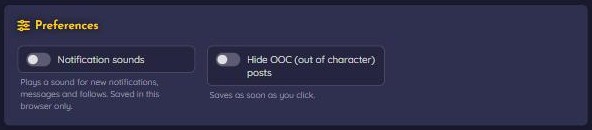
Not in the mood for out-of-character chatter? Supporters can hide OOC posts from their view. Go to Settings (hamburger menu, or the Dashboard toolbar) and click the Hide OOC (out of character) posts switch under Preferences. It saves straight away. Click it again to see them again.
One-Click Backups
Your writing is yours. Supporters can download a copy of all of it at any time.
- Go to your Dashboard (click the logo or choose Dashboard in the hamburger menu).
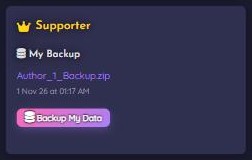
- In the My Backups box, click Backup My Data. Big accounts take a while, so be patient and let the page finish.
- When it is done, a download link appears in the same box. Click it to save the zip file.
- The backup covers all the posts and stories from your author account and all of your characters, together with the comments on them.
- Inside the zip is one text file per post or story, named with the writer, type, item number and title.
- Each new backup replaces the previous one, so there is only ever one backup file. Download it before you make the next one if you want to keep both.
Download before your supporter time runs out. Backup files are cleaned up for accounts that are no longer supporters. If your support is about to end, make a fresh backup and save it to your own computer.
Supporter Badge
Supporters get a Site Supporter badge with a heart icon on the Info tab of their author profile, a small public thank-you from the community.

Getting, Keeping and Renewing Supporter Features
- Support the site from the Support page. The supporter package is currently $40 per year.
- Afterwards, contact a Site Admin with your PayPal email and your author account email (if they are different) so we can verify the payment and switch the features on.
- Prefer to give in smaller amounts? Bring us support receipts that add up to $40 or more and we will turn the perks on.
Supporter features are tied to your author account, and they cover your author profile and all of your characters. You get friendly reminder emails roughly a month, a week and a day before they expire. To renew, contact an admin the same way.
What happens when supporter time ends?
- The extra editor tools, hide-OOC setting, backups, frames, color settings, story headers and Thread Tracker tab switch off. Your supporter badge goes away.
- You keep every character you already have, but you cannot add new ones while you have 25 or more.
- The 90-day inactivity rule applies to your account again.
Saving your hex codes is a good idea. If your supporter status lapses, your custom colors and fonts will be cleared. Renew early!
Questions?
Check the FAQs, ask on the Discord, or contact us. Thank you for keeping the lights on!